
I recently reviewed the iPad mini 8, and it has quickly become one of my favorite devices for reading. That’s saying a lot, considering how I’ve been an avid Kindle reader for over ten years. That said, the Kindle Colorsoft Signature Edition also offers a brilliant reading experience.The iPad mini 8 has many great features for reading. It’s slimmer and lighter, making it easier to hold for long reading sessions. The new OLED panel helps text and color images pop, and the nano-texture display option gives the panel a more paper-like feel.Even if the iPad mini 8 is more feature-rich, the Kindle Colorsoft is still a fantastic e-reader thanks to its light and sturdy build, large color display, and smooth integration with the Kindle ecosystem. And even the more expensive Signature Edition is still hundreds of dollars less than an iPad mini 8.You can read my iPad mini 8 review and Kindle Colorsoft Signature Edition review to learn more — but suffice it to say, these are among the best for reading. But which one is right for you? I’ll break down everything you need to know to help you decide.iPad mini 9: $699The iPad mini 8 is the most significant upgrade to Apple’s smallest tablet. The thinner, lighter design makes it more portable than ever, while the new 8.5-inch OLED panel delivers stunning image quality for videos and books. Powered by the A20 Pro chip, it also delivers fast performance and more-than-all-day battery life. Though pricier and missing features like Face ID and a 120Hz refresh rate, it still delivers a first-rate iPad experience.View DealThe Amazon Kindle Colorsoft Signature Edition (2026) improves on its predecessor with a thinner, lighter design and more vibrant color display. It’s arguably the best color e-reader right now, especially for Kindle users, though its steep price may deter some. But for what it delivers as a color e-reader, it’s hard to top.View DealiPad mini 8 vs. Kindle Colorsoft: Price(Image credit: Tom's Guide)The iPad mini 8 starts at $699 for the 128GB model with a glossy screen. You can upgrade to a model with the glare-reducing nano-texture display, but that requires upgrading to 256GB, which adds $200 to the overall cost.Conversely, the Amazon Kindle Signature Edition costs $319 with 32GB of storage and no ad support. The standard Kindle Colorsoft with 16GB of storage and without the aluminum back housing costs $289.The price difference between the iPad mini 8 and Kindle Colorsoft Signature Edition is substantial. Between the two, the Kindle is the more affordable option, though both are relatively expensive compared to their previous models.iPad mini 8 vs. Kindle Colorsoft: Design(Image credit: Tom's Guide)The new iPad mini 8 and Kindle Colorsoft have been redesigned to be thinner and lighter than their respective predecessors. As a result, they're easy to read for extended periods.Of the two, the iPad mini 8 is larger and heavier, measuring 7.69 x 5.22 x 0.21 inches and weighing 8.9 ounces. The Kindle Colorsoft Signature Edition is still pretty sizeable at 6.9 x 5.0 x 0.3 inches and 8.1 ounces, but it’s decidedly smaller in comparison.The iPad mini 8 is one single piece of machined aluminum, whereas the only aluminum part of the Kindle Colorsoft is its back housing. Still, both feel sturdy and smooth in hand. Both devices are also waterproof, with the iPad mini 8 rated IP67 and the Colorsoft rated IPX8. Colorwise, Apple’s miniature tablet comes in Midnight and Starlight, while the Kindle Colorsoft comes in Fig and Graphite.The iPad mini 8 has the more premium design overall, but both are elegant slabs in their own right.iPad mini 8 vs. Kindle Colorsoft: Display(Image credit: Tom's Guide)Here’s where things diverge sharply. Since we’re discussing a digital ink display against an OLED panel, which is admittedly not a one-to-one comparison, I’ll instead focus on the actual reading experience each provides to make things fairer.The iPad mini 8’s display is a big improvement over the past, thanks to its larger 8.5-inch display, thinner bezels, and higher resolution of 2316 x 1512 pixels at 326 pixels per inch (ppi). Its OLED panel also delivers excellent contrast and vivid colors. Novels, comics, and everything else look fantastic.(Image credit: Tom's Guide)Apple sent us a review unit with a nano-texture display, which makes the screen more comparable to a Kindle for reading by reducing glare. Plus, the texture itself gives it a more paper-like feel. While it stings that you have to pay $200 more for the 256GB model to get the nano-texture option, it’s a great feature.The Kindle Colorsoft has the same 7-inch 300ppi color display as the previous model, but Amazon has employed a new reverse-stack display construction to make the screen-to-bezel transition more seamless.While black-and-white content looks brighter and bolder on a Kindle Paperwhite due to this reader’s color layer, colors are bolder than before. Whether it’s books or comics, everything looks great. However, color reading drops the resolution to 150ppi.Though the iPad mini 8 might give you more eye strain since it can get significantly brighter, it still has the more vibrant display of the two. However, if you want a more paper-like experience, the Colorosoft beats the iPad.iPad mini 8 vs. Kindle Colorsoft: Battery life(Image credit: Tom's Guide)Battery life is the one area where the Kindle Colorsoft clearly beats the iPad mini 8. Apple rates the iPad mini 8 as having up to 10 hours of battery life while surfing the web on Wi-Fi. Meanwhile, Amazon says the Colorsoft can last up to eight weeks on a single charge.I’ve used the iPad mini 8 for nearly two weeks and have charged it about once every other day. Conversely, after almost three weeks, I still haven't charged the Kindle Colorsoft since I unboxed it. At the time of writing, it is at 60% battery life!Kindles have always boasted long battery life since they are dedicated e-readers, unlike an iPad, which is a more demanding computing device. It’s no surprise that the Colorsoft can last much longer than the iPad mini 8.iPad mini 8 vs. Kindle Colorsoft: Features(Image credit: Tom's Guide)This is another area where things don’t match one-to-one. You can read on both, but that’s about it on the Colorsoft, while the iPad mini 8 is basically a computer that can do so much more. To keep things fair though, I’ll focus on the respective Kindle ecosystem experiences the devices offer.Naturally, the Kindle Colorsoft integrates seamlessly with the Kindle Store and Goodreads. I can easily purchase new books right on the Kindle and also upload my reading status to Goodreads. (Image credit: Tom's Guide)UI-wise, the Home page shows all the books you’re currently reading or have read, a list of recommended books, and top Kindle Unlimited recommendations based on your reading history. You can also change the font, theme, and more within a book’s dedicated settings.The iPadOS version of the Kindle app has all these features, except that the UI is arranged differently to fit an iPad’s screen size. One downside is that you can’t buy books directly in the Kindle app. To do that, you’ll have to open a web browser and log in to Amazon. That said, the Kindle app still syncs your reading status across Kindles and other devices.One of Colorsoft’s major advantages over the iPad mini 8 is its truly distraction-free reading experience. You’ll never see pop-up notifications on a Kindle, whereas you’ll need to manually disable notifications on an iPad. It’s also much easier to wander off to another app on the iPad because everything is so easily accessible. On a Kindle, you can only read or browse for books.iPad mini 8 vs. Kindle Colorsoft: Bottom lineBoth the iPad mini 8 and Kindle Colorsoft are fantastic for reading. You can’t go wrong with either for that, but depending on what you’re looking for, one might suit you better than the other.If you want an enhanced version of the classic Kindle experience, then the Kindle Colorsoft is the device to get. Its new design is superb, and colors look better than ever. Yes, it’s now the second-priciest Kindle after the Kindle Scribe, but there’s no denying Amazon delivered a more refined color e-reader.Conversely, the iPad mini 8 impresses thanks to its premium design and mesmerizing OLED panel. Both black-and-white text and color images look absolutely stunning on its display. The lighter design also makes it more Kindle-like to hold. And if you want to do more than read, the iPad mini delivers strong performance for work, light gaming, and streaming videos.More from Tom's GuideI tested the new Kindle Paperwhite Signature Edition for two weeks — and it’s almost perfectI used the new Kindle (2026) for a week — and it’s the best entry-level ereader yetThe Alexa Tablet 12 Pro has strong Alexa+ integration — but it’s the hardware that won me over
iPad mini 8 vs. Kindle Colorsoft: These are two of the best devices I’ve used for reading, but one might be better for you than the other — I’ll help you decide which one to get
TO
Tom's GuideBy Tony Polanco 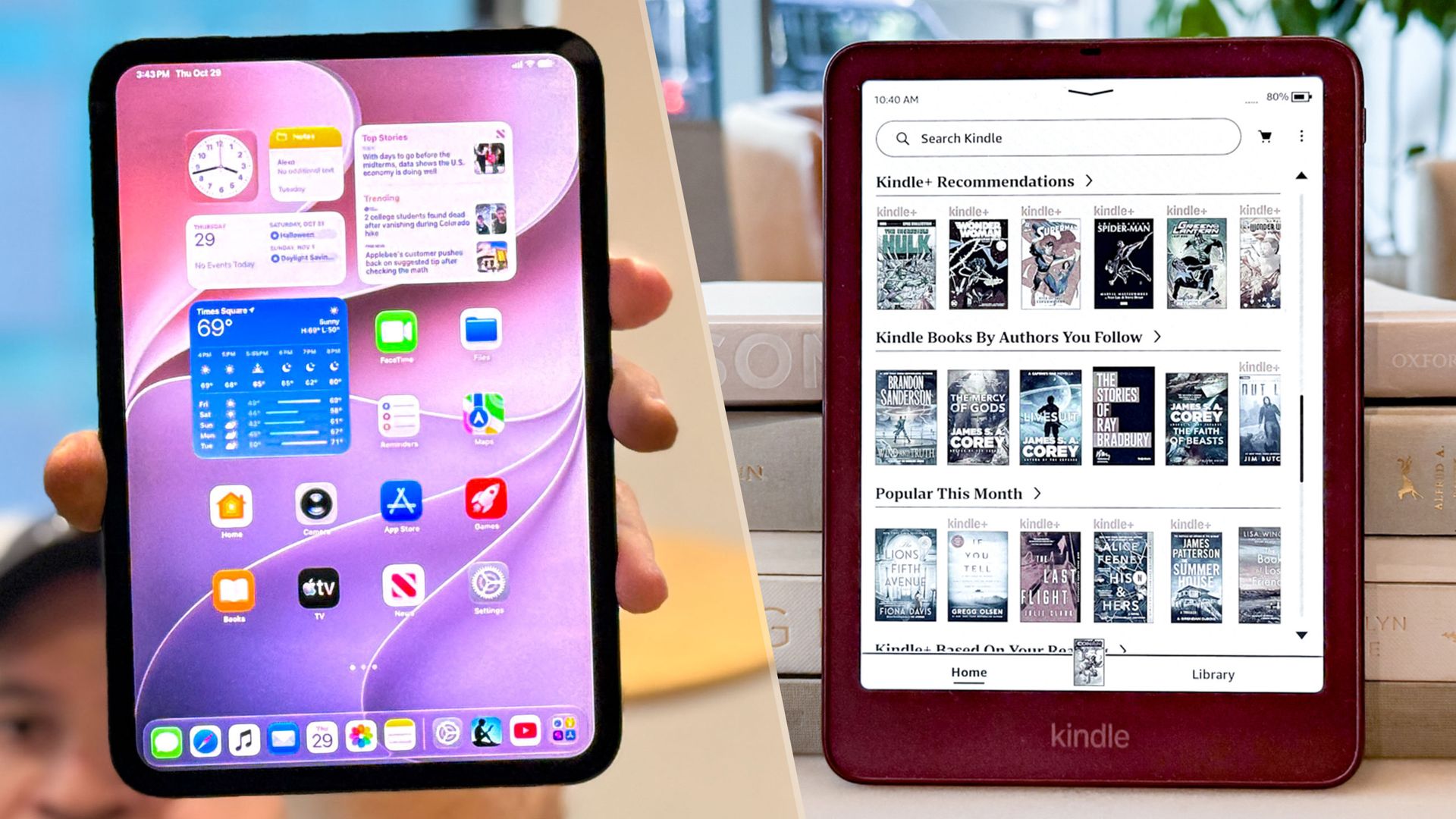
EXECUTIVE SUMMARY
The iPad mini 8 and Kindle Colorsoft both provide excellent reading experiences, but which one should you get? I explain their pros and cons to help you decide.
Key Takeaways
- Kindle Colorsoft: These are two of the best devices I’ve used for reading, but one might be better for you than the other — I’ll help you decide which one to get.
- The iPad mini 8 and Kindle Colorsoft both provide excellent reading experiences, but which one should you get?
- I explain their pros and cons to help you decide.
Read Complete Original Article
Published originally on Tom's Guide