
Streaming sticks don't need to be fancy to hit their mark, and the Amazon Fire TV Stick HD is a great reminder of that. If you've got an older TV that's still going strong but has sluggish smart features (or perhaps none at all), a $35 streaming stick is an easy fix.The 2026 Fire TV Stick HD runs Vega OS, Amazon's Linux-based software, which replaces the Android-based Fire OS that powered previous models. Amazon says the changes make it more than 30 percent faster, and it also brings a slimmer body, USB power, Wi-Fi 6 support, and free Alexa+.It's not all pros across the board. The resolution caps out at 1080p, you can't sideload third-party apps anymore, and there's no support for Dolby Vision. But if you're shopping for a bedroom, guest room, or an older TV set that you don't primarily use, the Fire TV Stick HD is one of the cheaper streaming devices you should take a closer look at.Amazon Fire TV Stick HD review: Price and availabilityThe Amazon Fire TV Stick HD launched on April 29, 2026, for $34.99, which is the same price as the 2024 model it replaced. It's Amazon's cheapest streaming stick, and it sits below the Fire TV Stick 4K and the Fire TV Stick 4K Max. Amazon ran a limited-time deal that brought the stick down to $21.99 shortly after launch, so we'll likely see temporary price cuts around the holiday shopping season.Keep in mind that the stick's new "Direct Power" feature means that it gets power right from your TV's USB port. If your TV doesn't have a USB port, you'll need to pick up an adapter separately.Amazon Fire TV Stick HD review: Design(Image credit: Future)The Fire TV Stick HD is about as minimal as a streaming device gets, and Amazon says it's the slimmest Fire TV device the company has made. That makes it really easy to tuck behind a TV or toss in a bag for a trip, and it won't crowd the other ports and cables on your set.The only other connection is a USB-C port for power, and thanks to "Direct Power," you can plug it straight into your TV's USB port with the included cable. That means you'll have one less wall adapter to hide, and your setup will look a lot cleaner as a result.(Image credit: Future)The included Alexa Voice Remote covers all the basics, including voice search, menu navigation, TV power, and volume controls. It doesn't have fancy extras like a remote finder or backlit buttons, but it gets the job done. (If you want Amazon's redesigned Fire TV remote, which I liked a lot more, you'll have to get the Fire TV Stick 4K.)Amazon Fire TV Stick HD review: Setup(Image credit: Future)Setup is about as easy as it gets. Just plug the stick into your TV's HDMI port, connect the USB-C cable to your TV's USB port, and follow the on-screen prompts. You'll then have to connect to Wi-Fi and sign in with your Amazon account, and you're off to the races.Since Vega OS only lets you install apps from the Amazon app store, you should make sure that the ones you use most are actually available. Netflix, YouTube, Disney+, Prime Video, Hulu, and other popular streaming services all run natively, but niche apps may be missing due to the lack of third-party app sideloading, which the older Fire OS allowed you to do.Amazon Fire TV Stick HD review: Performance(Image credit: Future)The Fire TV Stick HD has a quad-core 1.7GHz processor and 8GB of storage. It can stream up to 1080p resolution with HDR10, HDR10+, and HLG, and it supports Dolby Atmos through HDMI pass-through if you have a compatible sound setup. There's no Dolby Vision here, and it won't output 4K, so it's really only meant for 1080p TV sets.Vega OS keeps menus and home screen rows moving smoothly, and apps open quickly. I didn't have any issues switching between my most used apps on the fly. Amazon's "30 percent faster" figure is its own claim, so I wouldn't treat it as fact, but it definitely felt faster than my past Fire OS experiences.I also like that the Fire TV Stick HD isn't limited to video. You can pair a Bluetooth game controller and play cloud games through Amazon Luna or Xbox Game Pass, which is a fun bonus, and you can even connect a pair of headphones for late-night viewing. It comes with Alexa+ free of charge, which can come in handy when you're trying to hunt down something new to watch.(Image credit: Future)The downsides are pretty familiar to past Fire TV Sticks. A big chunk of the Fire TV home screen is taken up by recommendations and sponsored content, and you'll definitely notice it (especially if you're used to Roku's cleaner layout like I am). Sideloading third-party apps is also gone, which will bug those who liked using older Fire TV Sticks for apps that aren't available in Amazon's app store. Neither is a dealbreaker for the average viewer, but they're worth knowing about before diving in.Amazon Fire TV Stick HD review: VerdictThe Amazon Fire TV Stick HD is a fast, simple, and affordable streaming stick that's a perfect match for older HD TVs and secondary rooms. Vega OS feels speedy, the slim design and USB power keep things neat, and setup takes just a few minutes. You won't get 4K streaming resolution, Dolby Vision, or third-party app sideloading, but for $34.99 (or less on sale), it's hard to complain.If you're looking for an alternative pick, the base model Roku Streaming Stick ($39) also tops out at 1080p, but has a cleaner interface. In Amazon’s ecosystem, the new Fire TV Stick 4K costs $25 more, but you get 4K resolution output and a redesigned (and much better) remote. And if you're a tinkerer who wants to sideload apps, the Fire TV Stick 4K Max is the only Amazon stick that still runs Android-based Fire OS.If you've got an older 1080p TV and want a cheap way to get streaming apps on it, the Fire TV Stick HD is a solid choice that won't break the bank.
Amazon Fire TV Stick HD Review: Small, speedy, and easy on the wallet
TO
Tom's GuideBy Dylan Haas 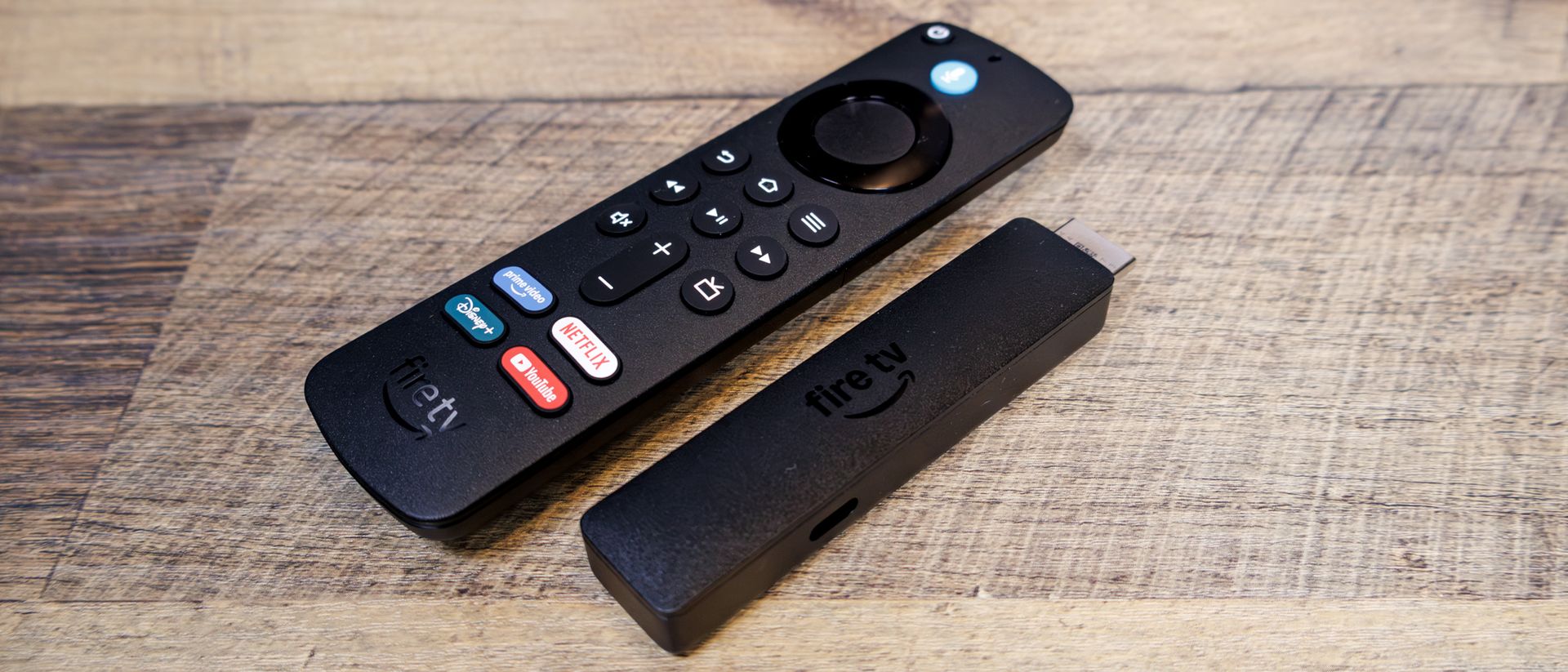
EXECUTIVE SUMMARY
The Amazon Fire TV Stick HD is a tiny, speedy, and affordable way to add smart features to your TV. It tops out at 1080p and drops sideloading Android apps, but at $34.99, it's an easy pick for a non-primary TV setup.
Key Takeaways
- Amazon Fire TV Stick HD Review: Small, speedy, and easy on the wallet.
- The Amazon Fire TV Stick HD is a tiny, speedy, and affordable way to add smart features to your TV.
- It tops out at 1080p and drops sideloading Android apps, but at $34.99, it's an easy pick for a non-primary TV setup.
Read Complete Original Article
Published originally on Tom's Guide